| Two free features are available with your Informed Delivery account to help you manage mail and packages more easily: |
| 1) Informed Delivery Mobile app |
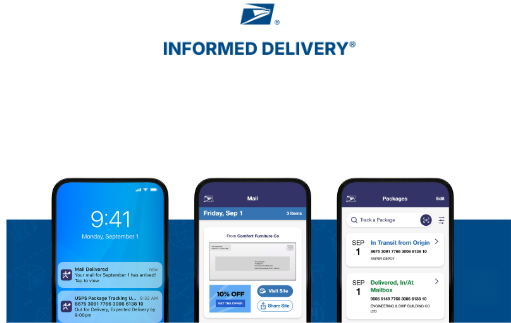
| Access your Informed Delivery account anytime, anywhere with the mobile app. With it, you can: |
| Receive push notifications for your Daily Digest, Mail Delivery Notification, and package updatesManage inbound packages, USPS Delivery Instructions®, and update your settings for Daily Digest and Mail Delivery NotificationView mail previews and sign in securely with optional biometric login |
| Download the Informed Delivery Mobile app on the Apple App Store and Google Play Store, then sign in with your USPS Informed Delivery credentials. |
  |
| 2) Mail Delivery Notification |
| Want more visibility into mail delivery? You can opt in to receive email or push notifications when your mail has been delivered. |
| To enroll, sign in to your Informed Delivery account, go to Settings, and opt in to Mail Delivery Notification. You’ll begin receiving notifications within 2 business days. |
|

 -
- -
- -
- -
- -
-